Overview: What is the vPenTest agent and how does it work?
What is vPenTest?
Developed by Vonahi Security, vPenTest is Vonahi Security’s platform that aims to solve organizations’ challenges seeking a penetration test. This is done by combining methodologies, toolkits, scripts, and processes into an automated procedure to help provide organizations with more value than traditional assessments.
Using vPenTest, organizations can expect to have a penetration test performed at any time for any reason to evaluate their risks to cyber attacks without the need of a physical human and coordination efforts.
vPenTest agent
Vonahi Security has developed an agent, coded in Ruby, that runs on top of Ubuntu. This agent is essentially responsible for transferring data between the Ubuntu system and the vPenTest server, including running commands.
How does the vPenTest agent work?
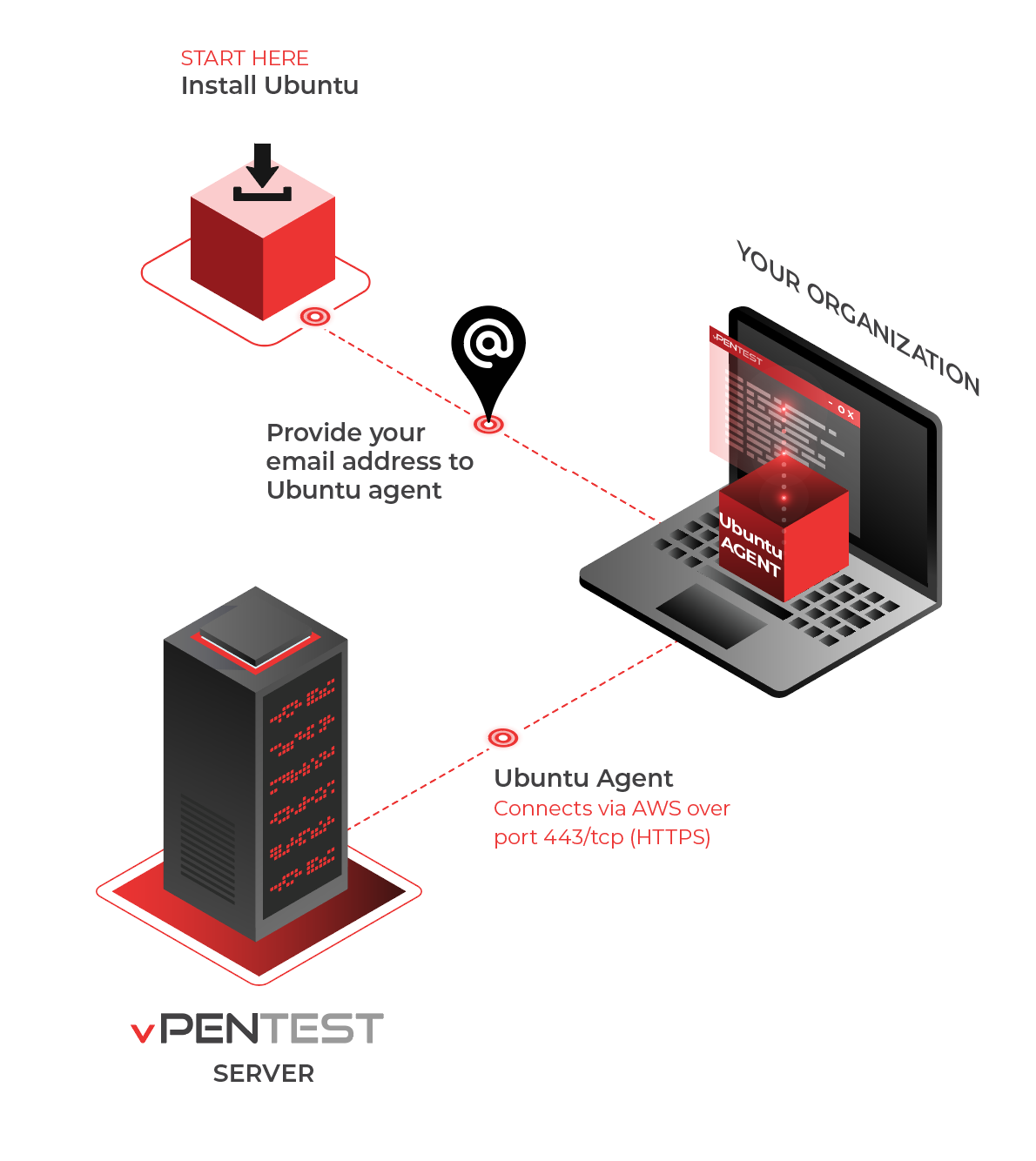
The vPenTest VM is only active before, during, and shortly after a penetration test. In other words, the VM is only connected and accessible by Vonahi Security specifically to perform its assessment.
To initiate connectivity, you must either provide your email address (that was registered in a organization’s settings in the portal) or a unique ID generated by your consultant or an agent in the portal. Once this information is provided, the agent will validate itself with the vPenTest server. If vPenTest detects malicious requests, the source public IP address will be blacklisted and the VM will be unable to connect.
Your VM will check to see if there is a scheduled assessment on a periodic basis. If a scheduled assessment is coming soon, the VM will auto-register itself to the vPenTest server again, allowing for remote connectivity from the vPenTest server.
Here’s an example of the vPenTest menu:
******************************************
* vPenTest Remote Access Agent v1.35 *
* Agent UUID: 31337x41 *
* Your public IP: 1.1.1.1 *
******************************************
1. Assign IP address configuration
2. Register Agent
3. Reboot
4. Shut down
5. Exit
Choose an option:
vPenTest agent status indicators
The Agent Status column displays two indicators:
First dot: Agent connection
Indicates whether the agent is online and successfully checking in with the vPenTest web services. A green dot means the agent is online and healthy.
Second dot: Cloud session
Indicates the agent’s connection to the vPenTest cloud session used during an assessment. This dot turns green only when the agent has an active cloud session while an assessment or scan is running.
The second dot is not expected to remain green. When no assessment is active, it normally remains gray or displays Not Started. If an assessment is scheduled to begin within the next 30 minutes, the agent attempts to establish the cloud session. If the agent is not checking in, refer to vPenTest Agent troubleshooting guide.
EXAMPLE A green first dot and a gray second dot indicate that the agent is online and healthy but is not currently running an assessment. During an active assessment, both dots should be green.
Permitting access
We leverage Amazon Web Services (AWS) to establish remote, secure access to your VM. All traffic occurring between vPenTest and your VM will originate from AWS, which the VM uses port 443/tcp (HTTPS) outbound to establish this access. Please allow outbound access to this port and to all destinations. Vonahi Security uses several Internet-facing services to perform updates, pull down additional tools, recompile tools, scripts, and more.


