Automatic User Creation
NAVIGATION Admin Settings > KaseyaOne > Enable Automatic User Creation
PERMISSIONS Admin or primary point of contact in vPenTest; Admin role in KaseyaOne
After KaseyaOne Unified Login is enabled for the vPenTest account, you can opt for your users in KaseyaOne who are granted access to vPenTest to have their vPenTest account automatically created when they log in for the first time. This feature is known as Just-In-Time (JIT) provisioning.
NOTE The user accounts that existed in vPenTest before this feature is enabled are not affected after it has been enabled.
Prerequisites
- You must have login credentials for vPenTest and KaseyaOne. If you do not have them, contact your administrator.
- Two-factor authentication must be configured for KaseyaOne.
- You must use the same email address for your vPenTest and KaseyaOne accounts.
- The Enable Log In with KaseyaOne toggle must be turned on in vPenTest. Refer to Enabling Log In with KaseyaOne in Setting up KaseyaOne Unified Login.
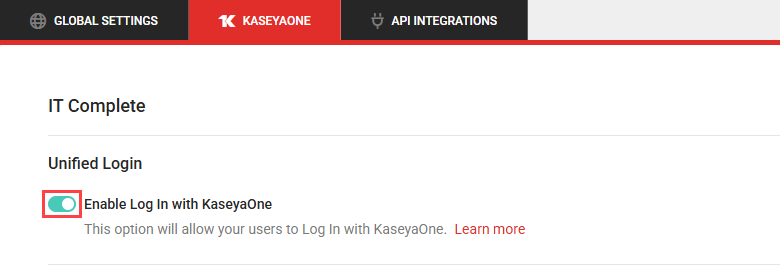
Enabling Automatic User Creation
Complete the following steps to enable Automatic User Creation in vPenTest:
- In the left navigation menu, click Admin Settings.
- Click the KaseyaOne tab.
- Turn on the Enable Automatic User Creation toggle.
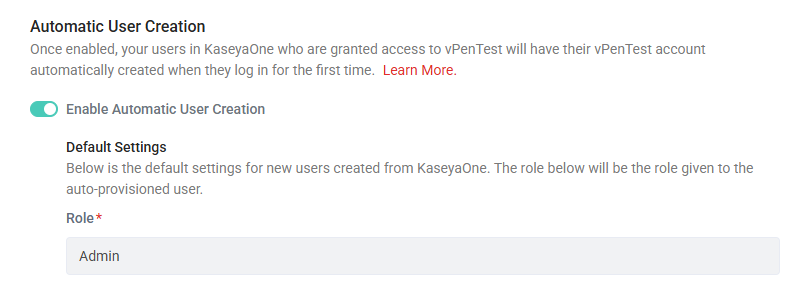
All automatically created user accounts are assigned the default vPenTest role displayed in the Role field.


