vPenTest release notes: November 18, 2024
This release focuses on a new feature on some fixes.
New feature
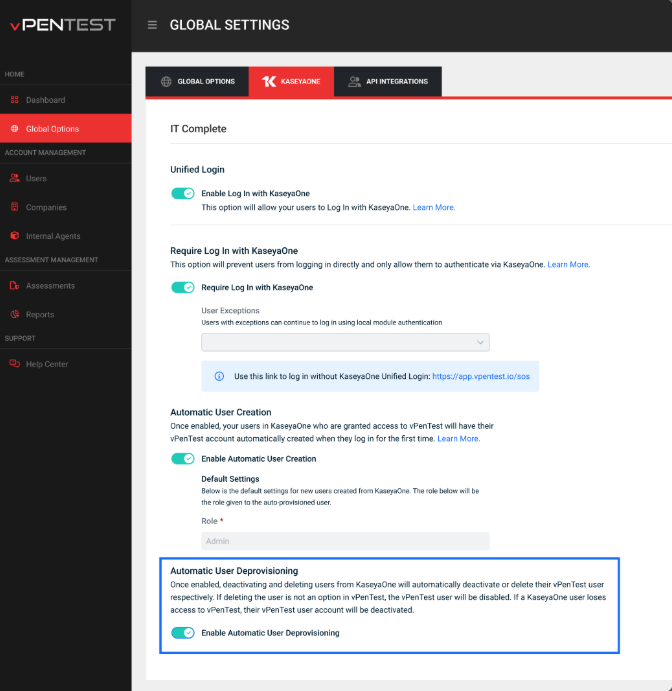
Automatic User Deprovisioning
This feature pushes user access changes from KaseyaOne to vPenTest when users get deactivated or deleted. It will reduce the manual process of deactivating or deleting users in vPenTest when they get deactivated or deleted in KaseyaOne.
This feature provides the following benefits:
-
vPenTest users will be automatically deactivated or deleted when they are disabled or deleted in KaseyaOne.
-
If a KaseyaOne user loses access to vPenTest by removing it from an access group, their vPenTest user account will be deactivated.
-
When a user is deleted in KaseyaOne, the same vPenTest user will also be deleted.
Prerequisites
You must be an admin or the Primary Point of Contact for vPenTest and master admin in KaseyaOne and have valid login credentials.
The Enable Log In with KaseyaOne toggle must be activated, and an active mapping must be done with a KaseyaOne account.
How it works
-
Navigate to Global Options page > KaseyaOne tab.
-
Make sure Enable Log In with KaseyaOne is enabled.
-
Turn on the Automatic User Deprovisioning toggle to enable this feature.
-
Visit our Knowledge Base to learn more.
Fixes
| Category | Description |
|---|---|
| Login | Corrected typos and UI inconsistencies on both the Password Reset and User Registration forms for a smoother login experience |
| Scheduling Assessment | Fixed an issue for MME users where scheduled tests weren’t launching as planned, and start dates were displaying as N/A on the Summary page despite dates being entered. |
| Scheduling Assessment | Fixed a JavaScript issue in the Scheduling Wizard that caused inaccurate AM/PM times on the Summary page. |
| Scheduling Assessment | Fixed an issue where scheduling a remediation test from a completed internal test would get stuck. |
| Legacy Per-Client Subscription | Fixed a calculation issue where Assigned Subscriptions for Per Client Partners exceeded Total Subscriptions |


