vPenTest release notes: November 4, 2024
This releases focuses on some enhancements and some fixes.
Enhancements
Trial users
Set Urgent as the default report priority in the Schedule Assessment Wizard for trial users, ensuring priority is given to trial assessments
Partner subscription
Partners on the new IP Pool licensing model can now schedule prospecting tests for their NFR company without these tests counting against their monthly allowed pentest assessments.
Added a condition to prevent deletion of companies with assigned IPs for partners on the IP Pool Model.
Assessment Dashboard
Removed port 0/tcp and 0/udp from the Host Discovery and Ports & Services tabs to reduce user confusion around irrelevant ports
KaseyaOne integration
Added condition to hide Require Log In with KaseyaOne banner and pop-up message, and User exception checkbox when Enable Log In with KaseyaOne is disabled.
Updated error message when Enable Log In with KaseyaOne fails due to non-matching emails to make it more user-friendly.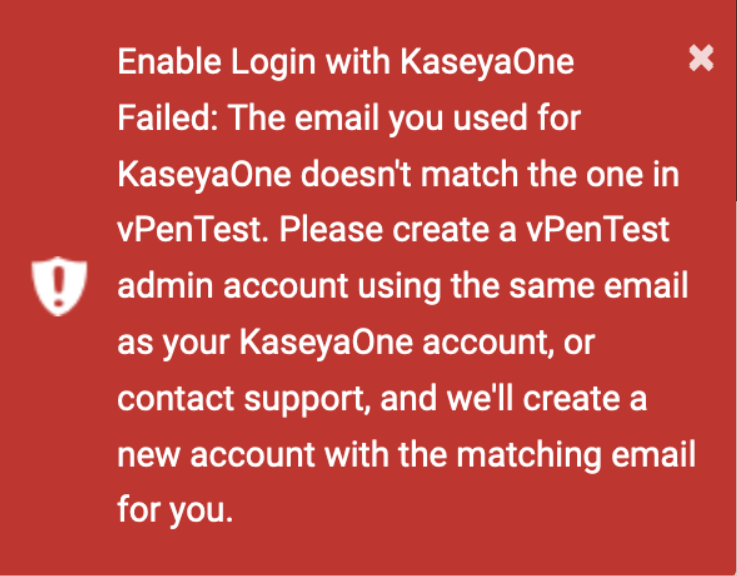
Fixes
| Category | Description |
|---|---|
| Global Options for MME company users | Fixed an issue that prevented updates to Basic and Advanced Settings in Global Options to reflect in the Schedule Assessment Wizard |
| Global Options for MME company users | Fixed an issue where the TCP and UDP port details were not shown and on clicking Next on Settings step in the Schedule Assessment Wizard displayed a pop-up related to different settings. |
| VulScan Integration | Fixed an issue where matching companies from the Company Profile page wouldn’t save successfully |
| KaseyaOne Integration | Fixed a bug displaying the KaseyaOne sign-in page despite the user already being signed in |
| KaseyaOne Integration | Fixed a bug that resulted in 406 error when partner tried to Enable Log In with KaseyaOne |


