vPenTest release notes: October 21, 2024
New feature
KaseyaOne Unified Login – Automatic User Creation
Onboarding employees can be a time-consuming task. Automatic User Creation automates this process, increasing efficiency and secure management of user accounts across systems.
How it works
-
Navigate to Global Options page > KaseyaOne tab.
-
Make sure Enable Log In with KaseyaOne is enabled.
-
Turn on the Automatic User Creation toggle to enable this feature.
NOTE If enabled, when a KaseyaOne admin onboards employees and grants them access to vPenTest, vPenTest will automatically create a vPenTest account for that new user when they log in for the first time. If disabled, new KaseyaOne users must ask their admin to create a vPenTest user account for them manually.
-
Click Save.
For details, visit our support article.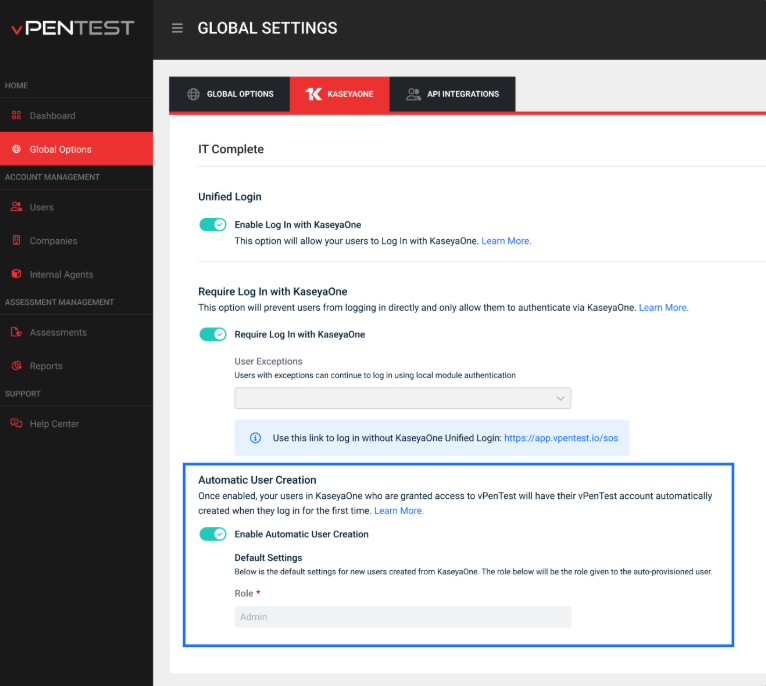
Enhancements
Internal Agents
-
Removed Port field from the View Agent Details pop-up as it was no longer relevant
-
Removed the Expiration date and Activation status fields from the New Agent, Edit Agent, and Show Agent Details pop-ups because they did not provide any useful functionality
Global Options
Updated report purging policy text to 90 days. (Previously, it was 60.)
UI
Added missing icon to Remember me checkbox on the login screen
Fixes
| Category | Description |
|---|---|
| Global Options | Fixed a bug where updates to Basic Settings in Global Options page was not reflected when scheduling an assessment |
| Global Options | Fixed issue with Require Log In with KaseyaOne toggle being selectable even when KaseyaOne login was disabled. |
| Subscription | Fixed issue with vPenTest not recognizing active subscriptions for legacy partners during Stripe renewals, even though the partner has one |
| Subscription | Corrected automatic IP deduction in IP Block model for completed assessments |
| Subscription | Fixed IP Usage stats inaccuracies for partners on IP Pool licensing |
| Company Profile Page | Fixed sorting issue by year in the Assessment Date filter on the Company Profile page |
| Company Profile Page | Corrected permissions issue allowing company users to edit scheduled tests even when not permitted to do so |


