vPenTest release notes: September 23, 2025
This release includes a new feature, an enhancement, and some fixes.
New feature
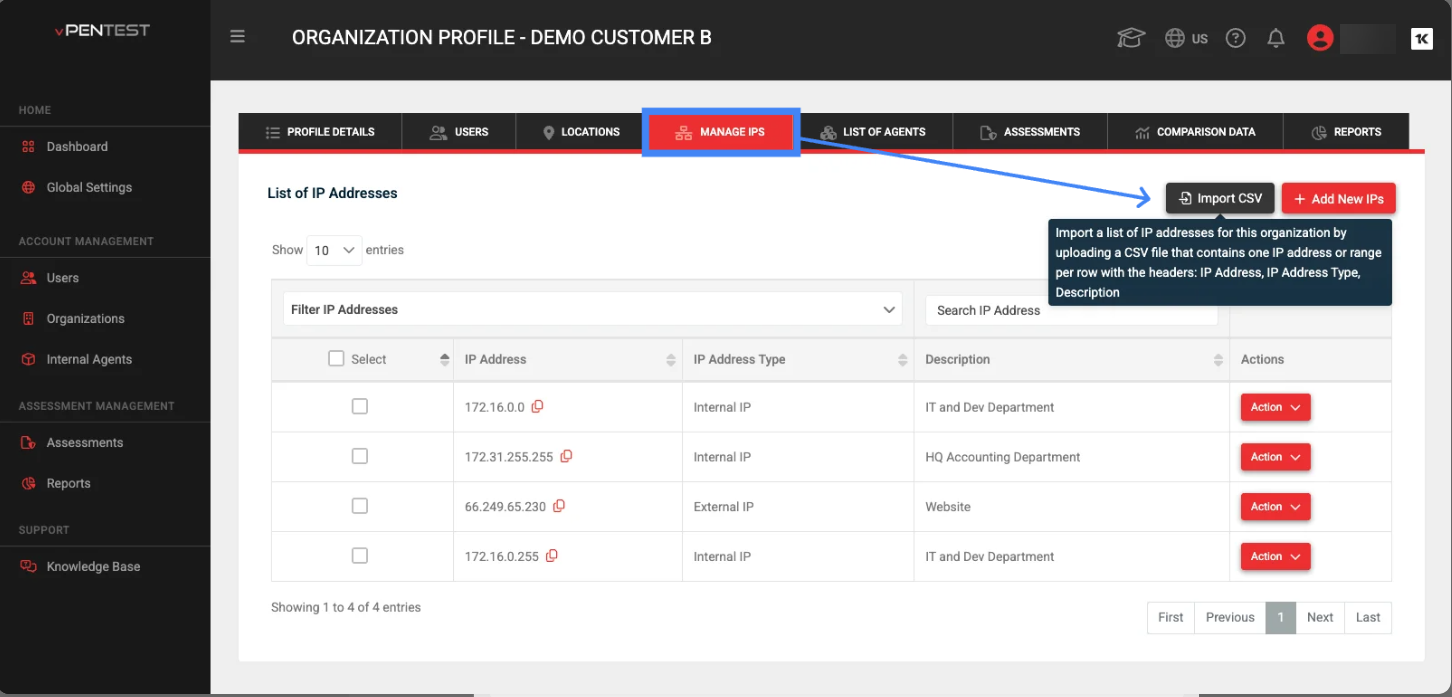
Bulk Import IPs via CSV in Managed IPs tab
We’ve made it easier for MSP partners and MME company users to manage large sets of IP addresses! You can now bulk import IPs directly from a CSV file in the “Manage IPs” tab of the Organization Profile page. This enhancement streamlines the process of adding multiple IPs, including their types and descriptions, all in one go—no more manual entry or repetitive updates.
-
Users can upload a CSV file with headers: IP Address, IP Address Type, and Description.
-
The new “Import CSV” button (with import icon) is available on the Organization Profile page > Managed IPs tab.
-
On hover, helper text guides users on the required CSV format.
-
When importing, if an IP already exists, the system updates the record with new details instead of creating duplicates.
Enhancement
Warn users when an agent is being deleted that is currently being used for an assessment
-
To prevent accidental data loss, users are now warned if they attempt to delete an agent that’s currently linked to an in-progress assessment.
-
If the user confirms deletion, the associated assessment and its data will be destroyed automatically, ensuring system integrity and reducing manual cleanup.
Fixes
| Category | Description |
|---|---|
| AWS instance | Scheduling blocked by Agent Still in Use is now resolved.
|
| Schedule an Assessment page | Accurate assessment name sorting
|
| MME organization members | Subscription end date pop-up for MME company users
|
| Schedule an Assessment page | All admins now appear in notification dropdown in Scheduling Wizard
|
| IP Pool | Remediation tests for IP Pool partners no longer halt incorrectly
|
| All Reports page | Missing reports when viewing 10 entries at a time
|
| Organizations page | Auto Purge After setting only applies when chosen
|


