vPenTest release notes: October 9, 2025
This release includes a new feature, enhancements, fixes, and security improvements.
New feature
vPenTest API
The vPenTest API enables direct integration with your existing systems or internal tools, eliminating the need for manual platform interaction. Developers can easily connect vPenTest to internal tools and workflows by pulling data such as organizations, agents, schedules, download URLs for all report types, and more. Unlocks new levels of automation, efficiency, and scalability to streamline security operations and accelerate your automation journey.
How it works
-
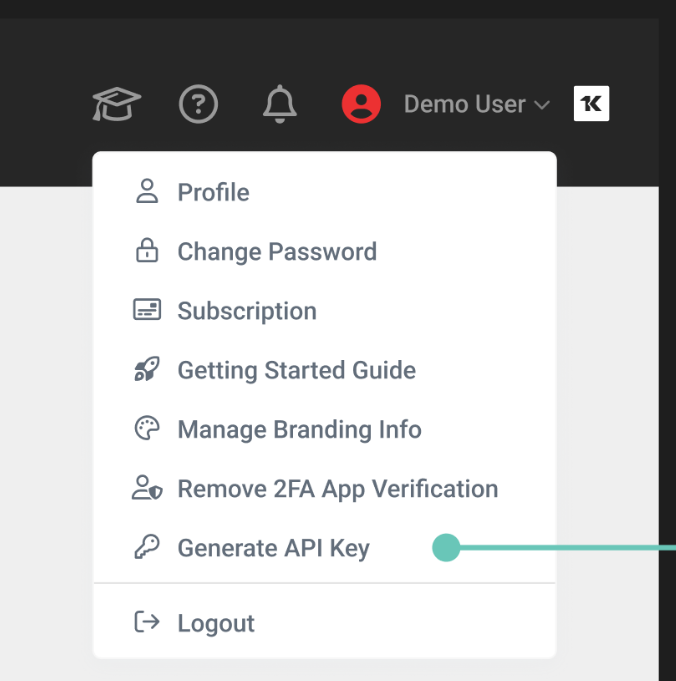
To generate an API key, click your profile drop-down menu in the top right corner of the header, then click Generate API Key.
-
Once your API is generated, view our documentation: https://app.vpentest.io/api/v3/docs
-
Learn more: vPenTest API
Enhancements
Basic and Advanced Settings for organization users
-
Organization users that belong to an MSP partner can now enable or disable Basic and Advanced Settings from their profile drop-down menu.
-
If their partner allows them to schedule assessments, vPenTest makes it easier to customize the assessment scheduling experience.
-
These options are available for all partner licensing types and only appear when permitted by the partner.
Fixes
| Category | Description |
|---|---|
| Accurate user login counts | Fixed an issue where user sign-in counts were being inflated due to health checks and session handling, which caused confusion and unnecessary security concerns for partners. Login counts now accurately reflect real user login counts. |
| New partner branding logos now display correctly. | Fixed an issue where newly uploaded logos for partner brands were not appearing as expected. Now, when you create or update branding for a partner, the new logo will display immediately, ensuring your custom branding is always visible. |


