vPenTest release notes: September 9, 2024
New feature
Export reports to Word for MSPs
Overview
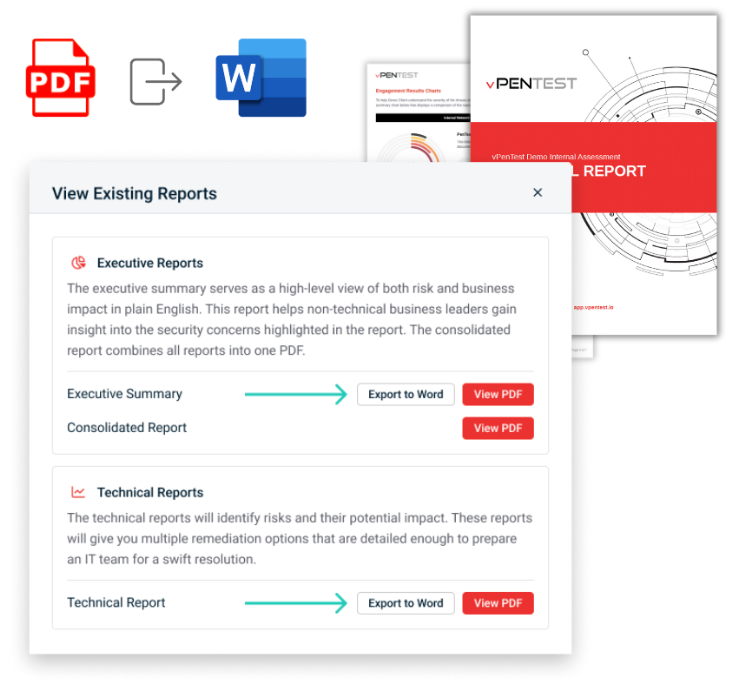
We’re excited to introduce a new feature that empowers our MSP partners by providing the ability to export their pentest reports as Word documents (DOCX). This feature allows partners who have custom branding enabled to further personalize their reports by making additional edits and tailoring them to meet their specific client needs.
Benefits
-
Easily modify reports to include additional findings or adjust content to better align with client expectations.
-
Ensure that reports reflect their brand by modifying themes and formatting before sharing with customers.
-
Export both the Executive Summary and Technical Report as DOCX for added customization flexibility.
-
Please note: This feature is available only to partners who have customized their report branding. It does not apply to Vonahi-branded reports.
How it works
Enhancements
UI
-
Improved spacing and button layout in the IP estimator pop-up
-
Updated dropdown icons for a more consistent appearance
-
Refined label backgrounds in the assessment tracker for improved readability
Fixes
| Category | Description |
|---|---|
| Login | Fixed an issue where vPenTest did not redirect users to their originally requested page after logging in |
| Subscription | Resolved an issue where the Monthly IP Reset date displayed negative values for partners on IP Pool licensing |
| Scheduling | MME trial assessments now properly display dates when scheduling. |
| Scheduling | Fixed an issue where "Require Approval before scheduling" did not trigger approval emails |
| Scheduling | Corrected the Summary step to accurately show Partner report branding and details |
| Assessment Dashboard | Fixed issue where data was missing from assessment tabs on initial view |
| Assessment Dashboard | Adjusted font size on the VulScan tab in the Assessment Dashboard. |
| UI | Fixed broken links to Knowledge Base articles throughout the app; links now open in a new window. |


