vPenTest release notes: March 10, 2025
This release focuses on a new killer feature, an enhancement, and some fixes.
New killer feature
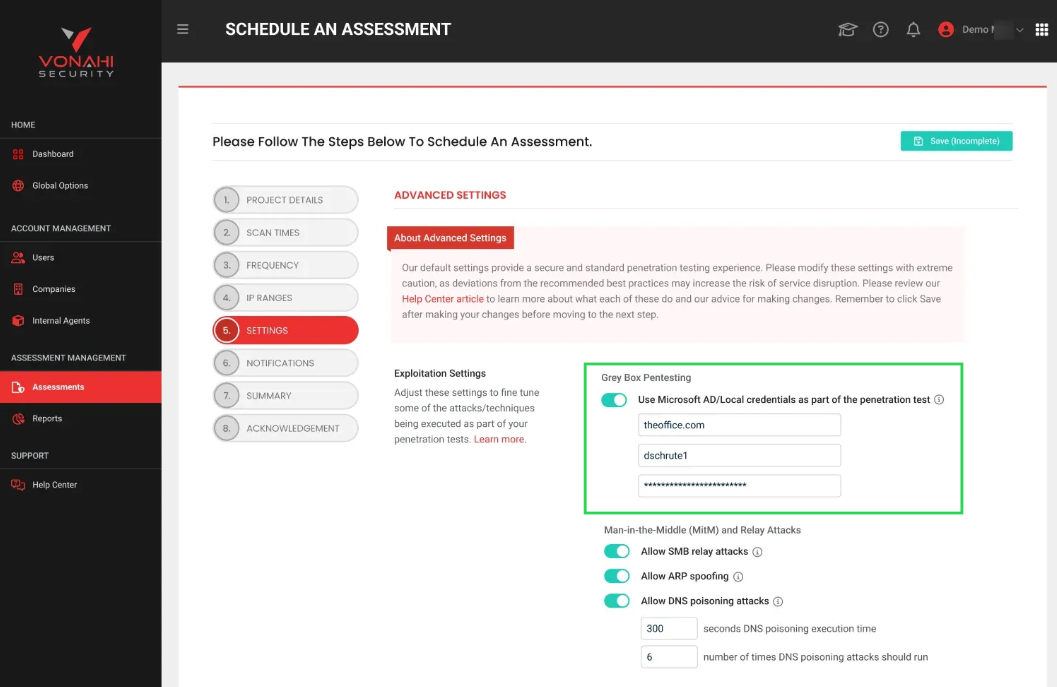
Grey Box Network Pentesting
Most cyberattacks start with compromised credentials, making it essential to understand how an attacker with limited access could escalate privileges or move through your network. This killer feature tests how much damage an attacker could do with a stolen login (e.g. Microsoft Active Directory or local accounts). It helps organizations:
-
Find weak spots where bad hackers could gain more access.
-
Identify over-permissioned accounts that expose sensitive data.
-
Prevent attackers from spreading across the network.
How it works
1. Prerequisites
-
The Advanced Settings option must be enabled.
-
The Assessment Type must be set to Internal.
-
Greybox pentesting is not available for external assessments.
2. Enabling Grey Box Pentesting
Navigate to Scheduled Assessment Wizard > Settings Step > Advanced Settings and turn on the toggle Grey Box Pentesting.
3. Providing credentials
Enter Microsoft AD or local credentials, which are fully encrypted and permanently masked after input.
4. During the pentest
-
vPenTest will attempt to authenticate using the provided credentials.
-
If valid, these credentials will be prioritized for deeper post-exploitation analysis, with findings reflected in the final report.
View our support article to learn more.
Enhancement
Updated app hyperlinks to open in a new window for a smoother browsing experience
Fixes
| Description |
|---|
| Resolved an issue causing subscriptions IPs not to reset properly |
| Fixed a JavaScript issue that caused the Advanced Settings option to disappear when switching between the assessment types in Step 1 of the Assessment Scheduling Wizard |


