vPenTest release notes: May 6, 2026
This release includes new region availability, navigation updates, API enhancements, bug fixes, and security improvements.
Enhancements
vPenTest now available in APAC region
vPenTest is now available in the APAC region. Use the Switch to region links on any login screen (US, EMEA, APAC) to sign in to your APAC account.
The APAC instance ships with the full reference catalog (finding categories, general findings, vulnerability blacklist, root causes, industries, device types, vulnerabilities) pre-loaded so reports look the same as on the US instance from day one.
Partners and clients in APAC can now keep customer pentest data within the region for data residency, compliance, and performance.
New navigation experience
The vPenTest UI has been updated to align with the broader Kaseya platform look and feel, bringing a more consistent and streamlined navigation experience across the application.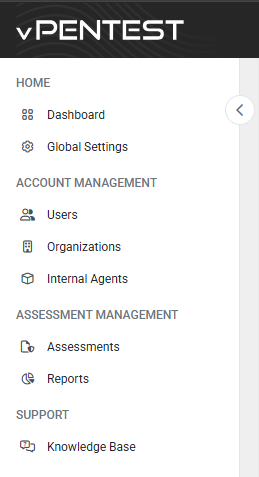
Refreshed look and feel
- Dynamically loaded logo in the header based on your organization’s branding
- Consistent dark theme in the header for all users
- Page titles, breadcrumbs, and footer removed for a cleaner layout
NOTE The new recommended logo size is 500 x 40 pixels (width x height). Logos that exceed either limit are scaled down proportionally with vertical centering and left alignment, but smaller logos are not automatically scaled up. vPenTest emails continue to use the standard logo so they stay readable across email clients with light backgrounds; the new logo is reserved for the in-app header.
Improved left navigation menu
- Built-in collapse/expand control
- Knowledge Base opens in a new browser tab so you don’t lose your place
Simplified top navigation menu
- Quick access to the new My Settings page for managing your own user account details, two-factor authentication, password, and API keys from a single location. Refer to Configuring your user profile settings.
- Getting Started Guide moved to the Help menu
- Your Admin Profile renamed to Organization Profile
- Toggles to instantly turn global settings on or off in the My Account menu
Streamlined notifications
- Notifications now shown in a single chronological list
- Announcements displayed as previews (no detailed drill-down view)
- New notification types: Enhancement and Bug Fix
- Notifications now read-only, with a single Mark All as Read option
Fixes
Reports
- Generating a report (or scheduling an assessment) with Vonahi global branding no longer produces an empty branding page; the Vonahi default theme now applies correctly.
- Images in report Executive Summaries now render correctly.
- Images in the Domain Information Gathering section of Consolidated PDF reports now render correctly. Newly generated reports display as expected; previously generated reports may need to be regenerated.
- Removing the Comparison Charts section in Manage Report Contents no longer breaks the Engagement Results Summary or Remediation Roadmap tables.
Branding
- Custom branding themes can be deleted again. Deleting a theme no longer returns a Page Not Found error.
- Channel Partner brand logo uploads now succeed for supported formats (jpg, jpeg, png, svg, webp, pdf).
Autotask integration
- Bullet formatting and links are now preserved in the body of tickets pushed to Autotask.
- Tables and bulleted lists embedded in finding descriptions now parse correctly into the resulting Autotask tickets.
- Autotask integration screens now respect partner custom branding colors.
- Autotask ticket status sync now updates correctly in the EMEA region.
- The organization mapping drop-down during partner Autotask setup now loads all organizations instead of being capped at the first 25.
Scheduled assessments
- Recurring scheduled assessments that require approval no longer drop future occurrences after the first instance completes.
- Location data now displays correctly when viewing a scheduled assessment from the Scheduled list.
- Approving a scheduled assessment from the email approval link no longer shows a misleading Assessment not found message. Partner consultants now see a clear success confirmation.


