vPenTest release notes: June 22, 2026
This release includes new features, an enhancement, bug fixes, and security improvements.
New features
Admin Settings page and Branding tab
A new Admin Settings page, which consolidates global configuration, is now available from the left navigation menu and via the gear icon in the header. This page includes the following tabs:
| Tab | Description |
|---|---|
| Admin Settings | The account settings, basic assessment settings, and advanced assessment settings previously available on the Global Settings page have moved here. |
| KaseyaOne |
KaseyaOne Unified Login settings previously available on the Global Settings page have moved here. |
| Integrations | The original API Integrations tab previously available on the Global Settings page has been renamed and moved here. |
| Branding | Revamped branding controls in the platform branding library are now available from this tab as well as the My Account menu. Refer to Customizing your portal branding. |
Subscriptions page
Partner and MME users can now view a dedicated Subscriptions page from the My Account menu. The page displays the user's current subscription model with a diagram explaining how the model works and a summary of included benefits. Clicking Contact your Account Manager redirects you to KaseyaOne, where you can log in to your account to access your account manager's contact information.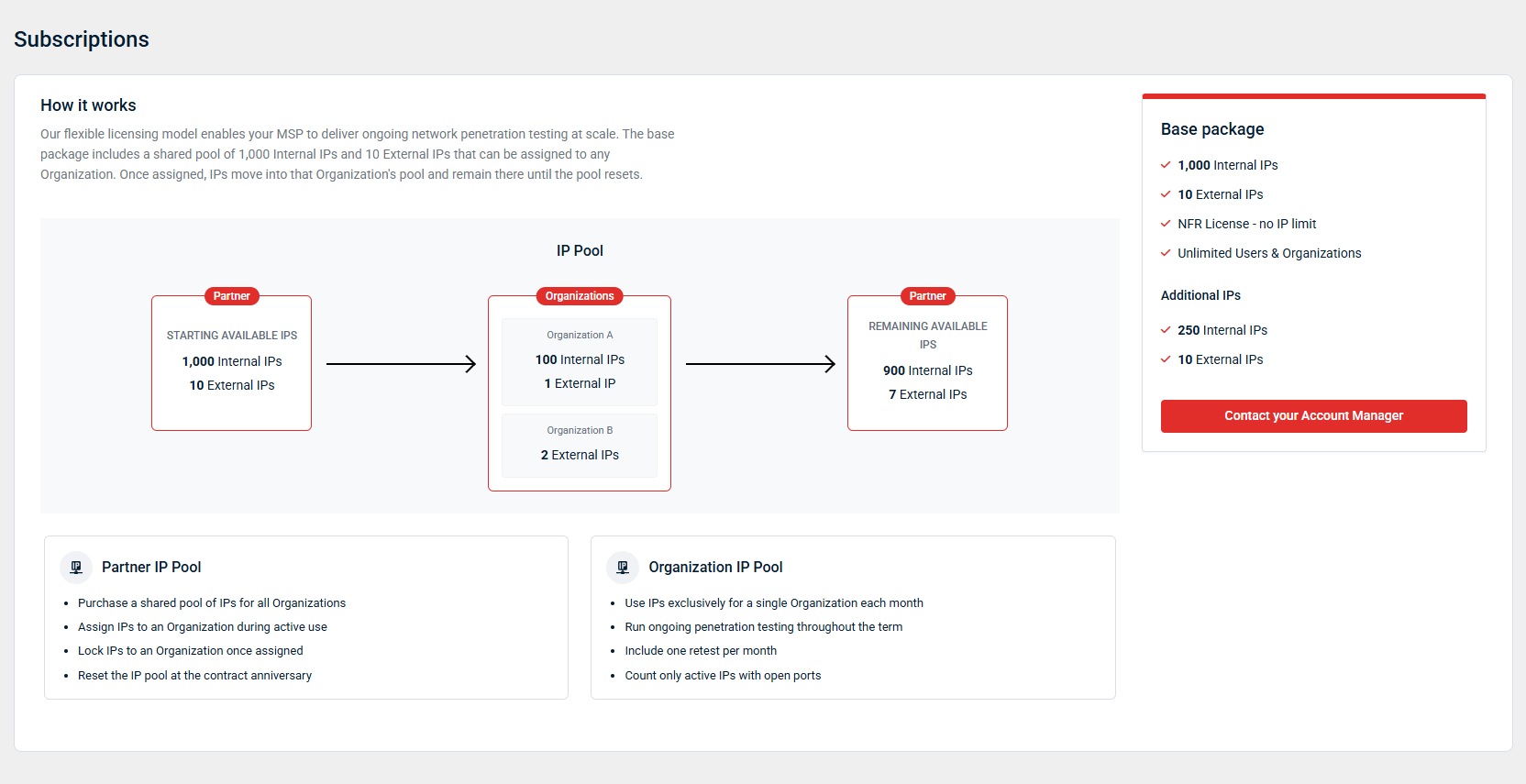
Quick-create navigation menu
A new Create menu, which allows you to initiate common workflows without navigating away from your current page, is now available via the + icon in the header. Available actions include starting an IP estimator scan, scheduling an assessment, adding an internal agent, creating an organization, and inviting a user. Each completed action is confirmed with a toast notification.
Refer to the following articles:
- IP Estimator
- Scheduling an assessment
- Creating and managing internal agents
- Creating and managing organizations
- Adding and managing user accounts
Legacy IP Block subscription type removed
The Legacy IP Block licensing model has been removed. All partners previously on this model have been migrated to current licensing options. This change eliminates a UI inconsistency and resolves an issue where affected partners saw an incorrect message about their subscription ending during assessment planning.
Enhancement
Notification enhancements
The notification menu now shows a red badge on the bell icon with an unread count when new notifications arrive. Individual notifications display a blue dot when unread. Hovering over the notification reveals options to mark it as read, mark it as unread, or clear it. Bulk Mark all as read and Clear actions remain available. Notification state (read, unread, or dismissed) persists across sessions and is scoped per user.
Fixes
- Autotask organization mappings beyond the first 10 are now saved correctly.
- An uploaded portal logo file is now required to save a custom brand, preventing the generic Add Your Logo call-to-action from appearing as the logo placeholder in emails sent from the portal.
- Broken report download links in emails have been fixed. Users can use the Download All Reports option to download ZIP files without encountering a The requested file does not exist error when attempting to open the download link via email.
- The Learning Center option in the Help menu now correctly opens the in-product interactive walkthrough.


